CamDoc: Building a Document Scanner App in React Native
Scan, clean, share
Turns phone photos into clean, shareable PDFs.


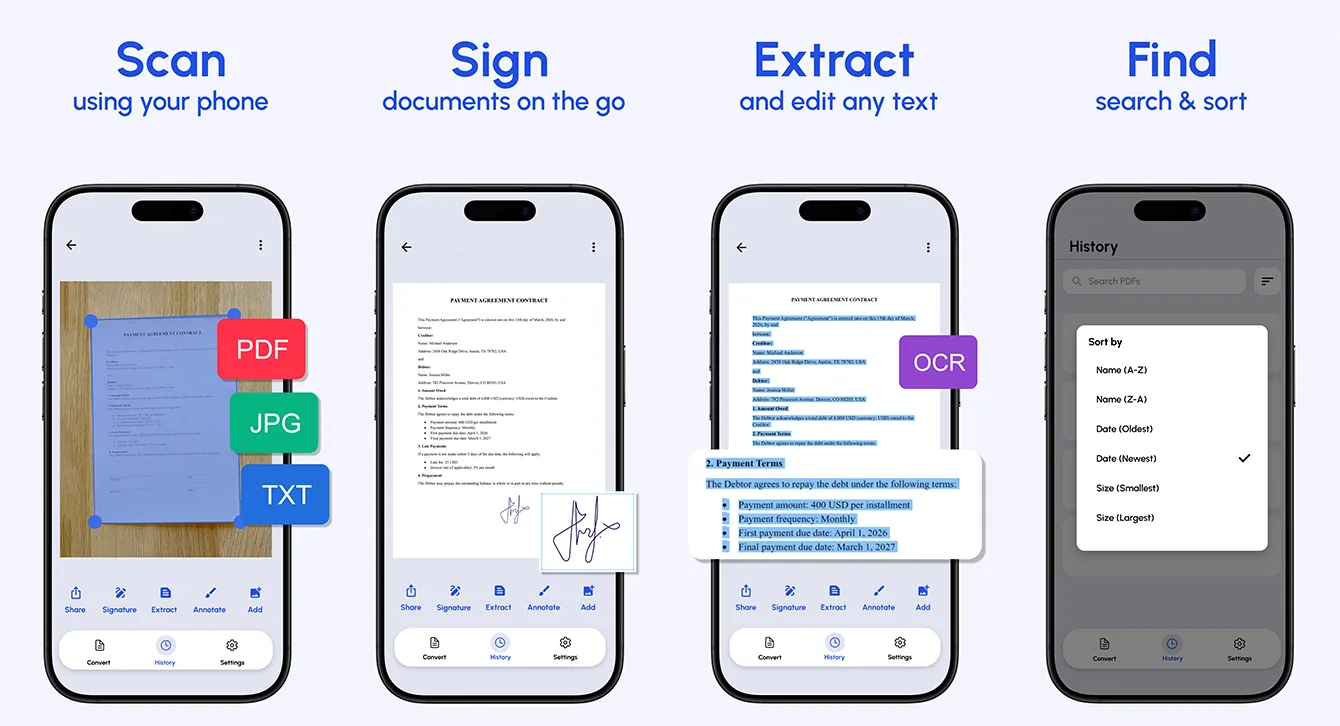
At a glance
CamDoc is our own document scanner app. It turns phone photos into clean PDFs using edge detection, perspective correction and image clean-up, adds OCR text recognition and e-signatures, and shares to email or cloud storage. One React Native codebase ships it to iPhone, iPad, Mac, Vision Pro and Android in 18 languages.
- Industry
- Productivity & Documents
- Type
- Own product
- Platforms
- iOS, iPadOS, macOS, visionOS, Android
- Languages
- 18
- Business model
- Free with one-off in-app purchases
- Team
- 4 specialists
- Delivered
- Cross-platform Development, MVP Development, UX/UI Design, QA, Support
- Tech stack
- iOS, Android, React Native, TypeScript, Nativewind CSS
Why we built a document scanner app
CamDoc is one of our own products. Most people still need to send paper - a signed contract, a receipt for expenses, a form for a landlord or a school - and most of them no longer own a scanner. What they have is a phone camera, and a photo of a page is a poor substitute for a scan: it arrives skewed, shadowed and unevenly lit, and it is the wrong file type for whoever asked for it.
The goal was narrow on purpose: turn photos of paper into clean, readable, shareable PDFs in a couple of taps, and get the file wherever it needs to go without a save-and-find detour. The App Store title, "JPG to PDF Converter", describes that job in the words people actually search for.
What the app does
- Scans documents and photos to PDF, JPG or TXT.
- Combines multiple pages into one document, with a review step to reorder, rotate or remove pages before export.
- Extracts text from scans with OCR (optical character recognition).
- Lets users create an e-signature once and place it on documents.
- Cleans scans with filters and noise removal so text reads as scanned, not photographed.
- Shares to email, print, and cloud storage including Dropbox, Google Drive, Evernote and OneDrive.
It runs on iPhone and iPad, on Apple-silicon Macs and on Apple Vision Pro, and on Android through Google Play - all from one React Native codebase.
How a phone photo becomes a clean PDF
The core of any document scanner app is the capture pipeline. Every page goes through the same three steps before it is added to a document.
1. Edge detection
The app finds the four corners of the page in the photo. Paper is rarely photographed square-on, and the background - a desk, a lap, a car seat - varies wildly, so the detection has to cope with low contrast between page and surface. When it is unsure, the user can drag the corners rather than retake the photo.
2. Perspective correction
Once the corners are known, a perspective transform maps the skewed quadrilateral back to a flat rectangle. This is what makes a page photographed at an angle look as though it went through a flatbed scanner, and it is the single biggest difference between a scan and a photo.
3. Contrast clean-up and noise removal
Phone photos carry shadows, colour casts and sensor noise. A clean-up pass evens out the lighting and lifts text off the background, and optional filters let users choose between a faithful colour copy and a crisp black-and-white document. The trade-off is file size against readability: the export has to be small enough to email and still legible when printed.
Multi-page documents without retakes
Real documents are captured out of order, sideways, or twice. Instead of forcing a retake, every page lands in a review screen where it can be reordered, rotated or removed before export, so the finished PDF is right first time.
Long documents are also where memory becomes a concern. Each page is a high-resolution image, and holding a dozen of them uncompressed is enough to slow down an older Android phone. Pages are processed and stored one at a time rather than kept in memory as a batch.
OCR, e-signatures and sharing
A scan app becomes a daily tool once it can do more than make a picture of a page. OCR turns a scan into text that can be exported as a TXT file, copied or searched. E-signature lets users sign a contract on the phone instead of printing, signing and scanning it again.
Sharing hands off to the platform's native share sheet, so a finished document goes straight to mail, messaging or any installed app, with direct uploads to Dropbox, Google Drive, Evernote and OneDrive, and printing for the cases where paper is still required.
Why React Native for a scanner app
Camera-heavy apps are often assumed to need fully native code. In practice, the performance-critical parts - capture and image processing - run in native modules, while everything around them (the review screen, settings, paywall, sharing flows and localisation) is product UI that React Native handles well. That split let one small team ship and maintain iOS, iPadOS, macOS, visionOS and Android builds from a single TypeScript codebase.
We go through where that line sits, and when it does not hold, in React Native vs native.
Monetisation and localisation
CamDoc is free to download, with two one-off in-app purchases - Unlimited Pro and PDF Premium - instead of a subscription. For a utility people reach for occasionally, a one-time unlock is easier to say yes to than a recurring charge.
The app is localised into 18 languages. Store listings and in-app copy in a user's own language matter more for a utility than for most apps, because the people searching for "PDF scanner" in Spanish, German or Japanese are rarely served by an English-only listing.
What we would do differently
We would ship OCR in the very first release. Text recognition is what turns a scanner from something used once a month into something used every week, and it shapes decisions elsewhere - file formats, export options and how documents are stored - that are cheaper to make early.
Building something similar?
Document scanning, OCR and e-signatures are now expected features in field-service, logistics, finance and HR apps, not just standalone scanners. If your product needs to capture paperwork from a phone, the same pipeline applies.
See how we approach React Native app development.
Frequently asked questions
How does a document scanner app work?
It detects the four edges of the page in a camera photo, applies a perspective correction to flatten it into a rectangle, then cleans up contrast and noise so the text reads like a scan. Pages are then combined into a PDF and, optionally, run through OCR to extract the text.
Can you build a document scanner app with React Native?
Yes. The image capture and processing run in native modules, and the rest of the app - review screens, settings, purchases and sharing - is written once in React Native. CamDoc ships to iPhone, iPad, Mac, Vision Pro and Android from one codebase.
What features does a PDF scanner app need?
At minimum: automatic edge detection, perspective correction, image clean-up, multi-page documents with reordering, and PDF export with sharing. Users increasingly expect OCR text recognition, e-signatures and direct uploads to cloud storage such as Google Drive and Dropbox.
What is OCR in a scanner app?
OCR, or optical character recognition, converts the text in an image into real, selectable text. In a scanner app it lets users copy, search or export the words on a page - CamDoc can export a scan as a TXT file for that reason.
Should a scanner app use a subscription or a one-time purchase?
It depends on how often people use it. CamDoc is free with one-off in-app purchases, because a utility used occasionally converts better with a single unlock than with a recurring charge. Apps used daily in a work context can justify a subscription.
Related reading
Selected work
View All


Got a project in mind?
Fill the form and get a free consultation!
What will happen next?
- 1We review your request and reply within one business day (Mon-Fri, CET time zone)
- 2We contact you to arrange a meeting at a suitable time, regardless of your location
- 3We send a free quote plus our thoughts on the best approach for you
- 4Even if we do not work together, consider us a free technical resource to bounce your thoughts and questions off