PhotoWeigh: Estimating Weight From a Photo With AI
Snap, estimate, convert
Estimates the weight of an object from a photo.

At a glance
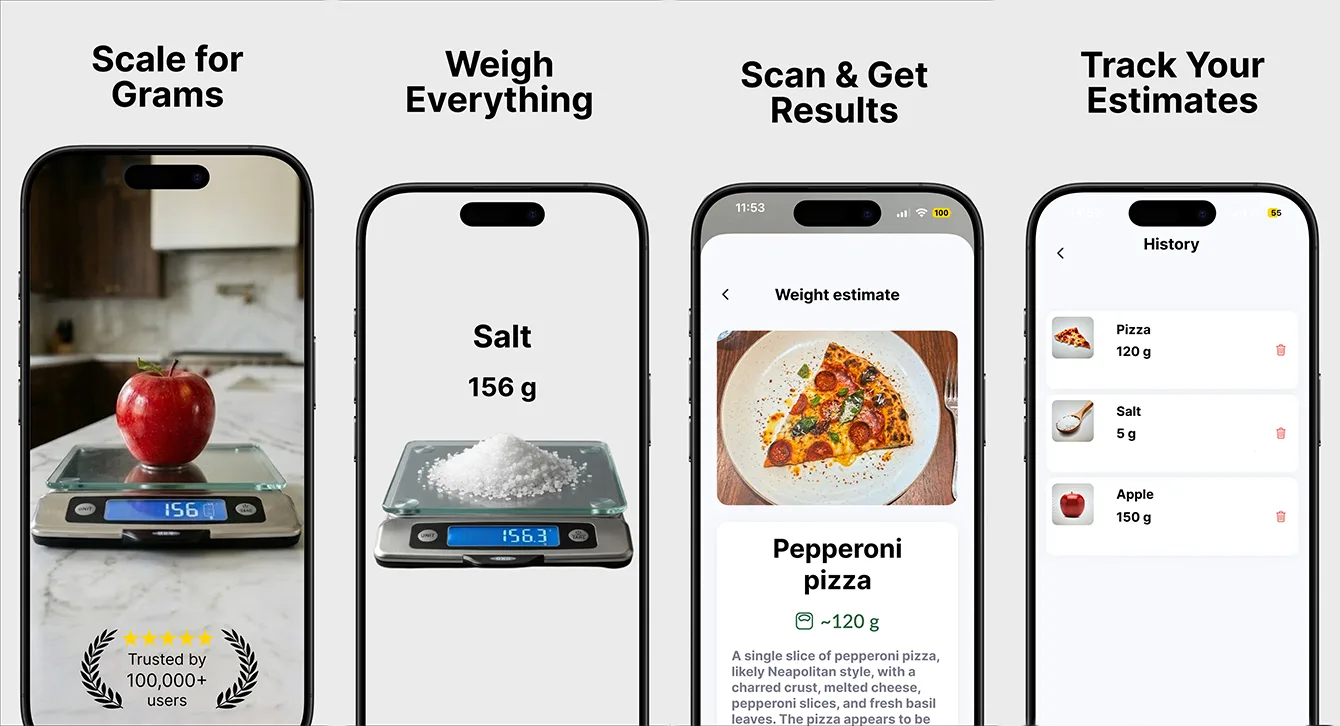
PhotoWeigh is our own app for estimating weight without a scale. AI visual recognition identifies the object, a reference item in the frame gives the photo a known scale, and the result is shown as an estimate in grams, ounces or pounds. It is built in React Native and available in 41 languages.
- Industry
- Utilities & Tools
- Type
- Own product
- Platform
- iOS (App Store)
- Languages
- 41
- Business model
- Free with Premium or a yearly plan
- Team
- 4 specialists
- Delivered
- Cross-platform Development, MVP Development, UX/UI Design, QA, Support
- Tech stack
- iOS, Android, React Native, TypeScript, Nativewind CSS
The idea: a scale in your pocket
There are plenty of moments when you want to know roughly how much something weighs and there is no scale nearby: portioning food, following a recipe abroad, checking whether a parcel is under a postage limit. PhotoWeigh is one of our own products, built to give a quick estimate from a single photo.
It is listed on the App Store as "Scale for Grams", which is how people describe the need when they search for it.
What the app does
- Estimates the weight of an everyday object from one photo.
- Uses AI visual recognition to identify what the object is.
- Uses a reference item in the frame to establish real-world scale.
- Covers common food and household categories.
- Converts between grams, ounces and pounds on the spot.
- Keeps recent measurements to hand for quick re-checks.
Can an app estimate weight from a photo?
It can estimate it - and the word estimate matters. A photo contains no direct information about weight, so the app has to infer it from two things it can work out: what the object is, and how big it is.
Step 1: what is it?
Two objects of the same size can weigh very different amounts depending on what they are made of - a loaf of bread and a block of cheese, for example. AI visual recognition identifies the object and places it in a food or household category, so the estimate is based on what it is, not only on how big it looks.
Step 2: how big is it?
A single photo has no sense of scale: the same apple looks large up close and small from a distance. Placing a reference item of known size in the frame gives the image a ruler, so the object's real dimensions can be worked out.
Step 3: the estimate
With a category and a size, the app produces an estimated weight and shows it in the user's preferred unit, with grams, ounces and pounds a tap apart.
Setting honest expectations
The most important product decision in an app like this is how it talks about its own output. PhotoWeigh presents every result as an estimate, explains the reference-item step at the moment of capture rather than in a help page, and is positioned for the times a kitchen scale is not at hand - not as a replacement for one when precision matters.
Stack and approach
The app is built in React Native with TypeScript and NativeWind. The capture flow, results, unit conversion, history and paywall share one codebase, so the four-person team could spend its time on the estimation and the capture experience rather than on platform plumbing.
Why we default to one codebase, and when we would not, is in React Native vs native.
Monetisation and reach
PhotoWeigh is free to download, with a one-off Premium upgrade or a yearly plan. It is localised into 41 languages, because weighing food and post is an everyday need everywhere, and units and habits vary by country.
What we would do differently
We would show a range rather than a single number from the first release. An estimate presented as "about 180-220 g" sets a more honest expectation than "200 g", and users trust a tool more when it is upfront about its margin.
Building an AI or computer-vision app?
Photo-to-answer products - estimating, identifying, measuring - are now practical to build on mobile. The difference between a gimmick and a useful tool is mostly in the capture guidance and in how honestly the result is presented.
Validate an idea like this quickly with a 30-day MVP.
Frequently asked questions
Can an app estimate weight from a photo?
It can give an estimate. The app identifies what the object is with AI visual recognition, works out its size using a reference item of known dimensions in the frame, and infers a weight from those two. It is a convenient approximation, not a replacement for a scale when precision matters.
Why do photo weight apps need a reference object?
A single photo has no sense of scale - an object looks bigger the closer the camera is. A reference item of known size in the same frame acts as a ruler, so the app can calculate the object's real dimensions.
How accurate is weighing food with your phone camera?
Accuracy depends on the object, the photo and the reference item, so any photo-based weight should be treated as an estimate. PhotoWeigh presents results that way and is meant for moments when a kitchen scale is not available.
What units can PhotoWeigh show?
Grams, ounces and pounds, switchable on the result screen. Recent measurements are kept so they can be checked again quickly.
Related reading
Selected work
View All


Got a project in mind?
Fill the form and get a free consultation!
What will happen next?
- 1We review your request and reply within one business day (Mon-Fri, CET time zone)
- 2We contact you to arrange a meeting at a suitable time, regardless of your location
- 3We send a free quote plus our thoughts on the best approach for you
- 4Even if we do not work together, consider us a free technical resource to bounce your thoughts and questions off