Tabata Timer: Building a HIIT and Interval Timer App
Set, train, track
Customizable HIIT and interval timer for athletes.


At a glance
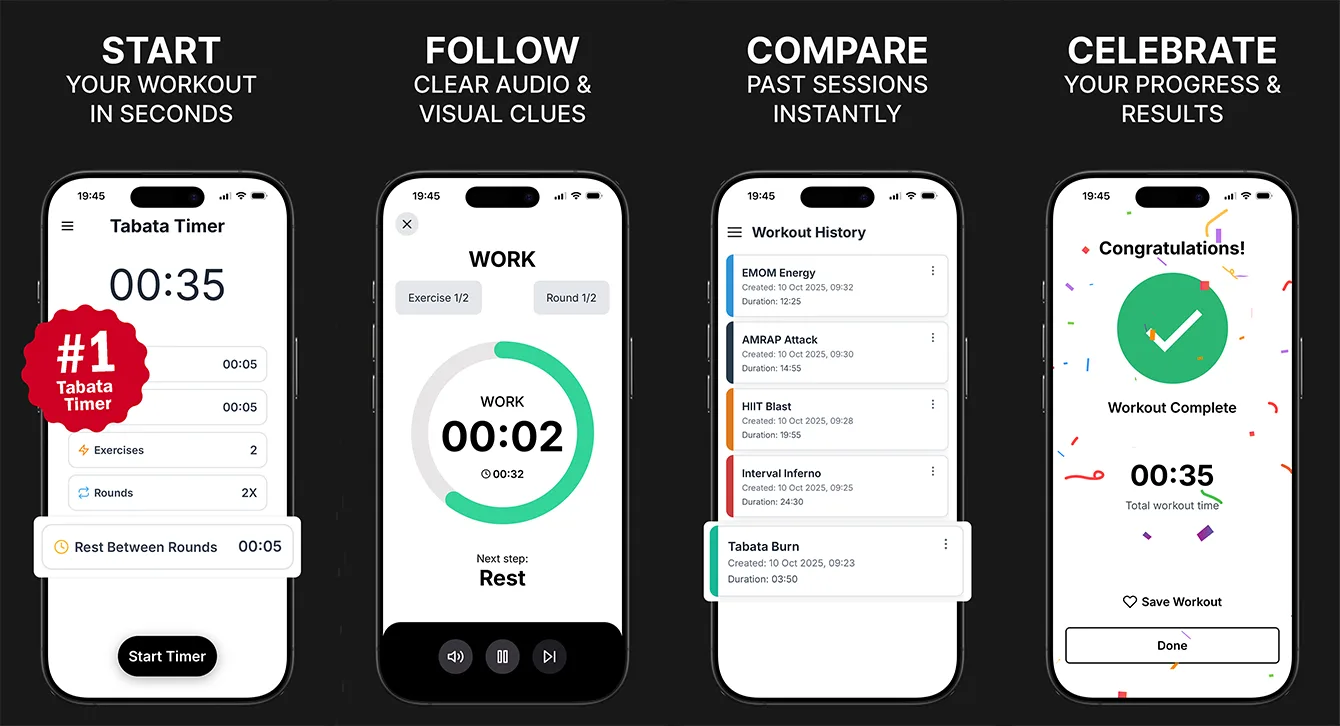
Tabata Timer is our own workout timer for Tabata, HIIT, EMOM, AMRAP and circuit training. One configurable model of work, rest and rounds covers every format, voice and sound cues announce each transition, and history stays on the device. It is live on iOS and Android, in 28 languages, and collects no user data.
- Industry
- Health & Fitness
- Type
- Own product
- Platforms
- iOS, Android
- Languages
- 28
- Data collected
- None
- Status
- Live and actively maintained
- Team
- 4 specialists
- Delivered
- Cross-platform Development, MVP Development, UX/UI Design, QA, Support
- Tech stack
- iOS, Android, React Native, TypeScript, Nativewind CSS
The brief: one timer for every interval format
Interval training comes in many shapes. Tabata is 20 seconds of work and 10 of rest, eight times. EMOM starts a new set every minute on the minute. AMRAP is as many rounds as possible in a fixed time. HIIT and circuit sessions mix all of the above. Most timer apps either support one format well or bury the others behind modes and menus.
Tabata Timer is one of our own products, built to cover all of them with one flexible setup, and to stay usable in the middle of a set - when the person using it is out of breath, a few metres from the phone and has no intention of touching the screen.
What the app does
- Fully customisable intervals, sets and rest periods.
- Works for Tabata, HIIT, EMOM, AMRAP and circuit workouts.
- Voice cues and sound alerts announce every transition.
- A clean, distraction-free interface readable at a glance.
- Workout history to track consistency over time.
One configurable model instead of many modes
Every format above can be described with the same three numbers: how long each work interval lasts, how long each rest lasts, and how many rounds and sets there are. Building the app around that one model, rather than a separate screen per format, kept the interface small and meant a new format is a preset, not a feature.
| Format | Work | Rest | Rounds |
|---|---|---|---|
| Tabata | 20 s | 10 s | 8 |
| EMOM | Up to 60 s | Remainder of the minute | Any |
| AMRAP | Whole block | None | 1 |
| HIIT / circuits | Custom | Custom | Custom |
How to build a workout timer that stays accurate
A timer that drifts is worse than no timer. The naive approach - subtract one second every time a one-second tick fires - accumulates error whenever the phone is busy, and stops entirely when the app is backgrounded or the screen locks.
The reliable approach is to record when the current interval started and calculate the remaining time from the clock on every update. The display can then refresh as often as it likes without the countdown slowly falling behind, and the timer is correct the moment the user returns to the app.
Audio cues that work alongside music
Most people train with music or a podcast playing. Voice and sound cues have to be heard over it without stopping it, and they have to fire on time on both iOS and Android, which handle audio sessions differently. Cues are configured to play alongside other audio rather than interrupting it, so a transition is announced and the playlist carries on.
Designing for mid-workout use
- The current interval and countdown are the largest things on screen and readable from across a room.
- Controls during a session are kept to the minimum: pause, resume and stop.
- Every transition is announced by voice or sound, so the screen never has to be watched.
Privacy by default
Tabata Timer collects no data at all - the App Store privacy label reads "The developer does not collect any data from this app". Workout history is kept on the device. For a simple utility, not collecting data is the easiest privacy policy to keep and one less reason for a user to hesitate before downloading.
Where it stands now
The app is live on the App Store and Google Play, built in React Native with TypeScript and NativeWind, localised into 28 languages and still actively maintained with regular releases. It is free to download, with optional premium upgrades as in-app purchases.
What ongoing releases involve after launch is covered in mobile app maintenance after launch.
What we would do differently
We would ship saved workout templates in the first version. Most people repeat the same handful of sessions, and setting them up from scratch each time is the main friction a timer app has.
Planning a fitness app? See our React Native app development services.
Frequently asked questions
How do you build an interval timer app?
Model every workout as work intervals, rest intervals and rounds, so Tabata, EMOM, AMRAP and HIIT are presets of one setup. Calculate the remaining time from the interval start time rather than counting ticks, and announce transitions with audio so users never need to watch the screen.
How do workout timer apps stay accurate when the screen is locked?
By storing when the current interval began and computing the remaining time from the clock, instead of decrementing a counter on every tick. Counters drift when the phone is busy and stop in the background; timestamp-based timers are correct whenever the app checks.
What is the difference between Tabata, HIIT, EMOM and AMRAP?
Tabata is a specific HIIT protocol of 20 seconds work and 10 seconds rest for eight rounds. HIIT is any high-intensity interval training. EMOM starts a new set every minute on the minute, and AMRAP means completing as many rounds as possible in a fixed time.
Can a timer app play cues over music?
Yes. The app's audio is set up to mix with other audio instead of taking over, so voice and sound cues are heard over a playlist or podcast without stopping it. iOS and Android handle this differently, so it needs testing on both.
Related reading
Selected work
View All


Got a project in mind?
Fill the form and get a free consultation!
What will happen next?
- 1We review your request and reply within one business day (Mon-Fri, CET time zone)
- 2We contact you to arrange a meeting at a suitable time, regardless of your location
- 3We send a free quote plus our thoughts on the best approach for you
- 4Even if we do not work together, consider us a free technical resource to bounce your thoughts and questions off