Bebela: Building a Pregnancy Test Reader App
Photograph, analyse, understand
Reads pregnancy test results from a photo.

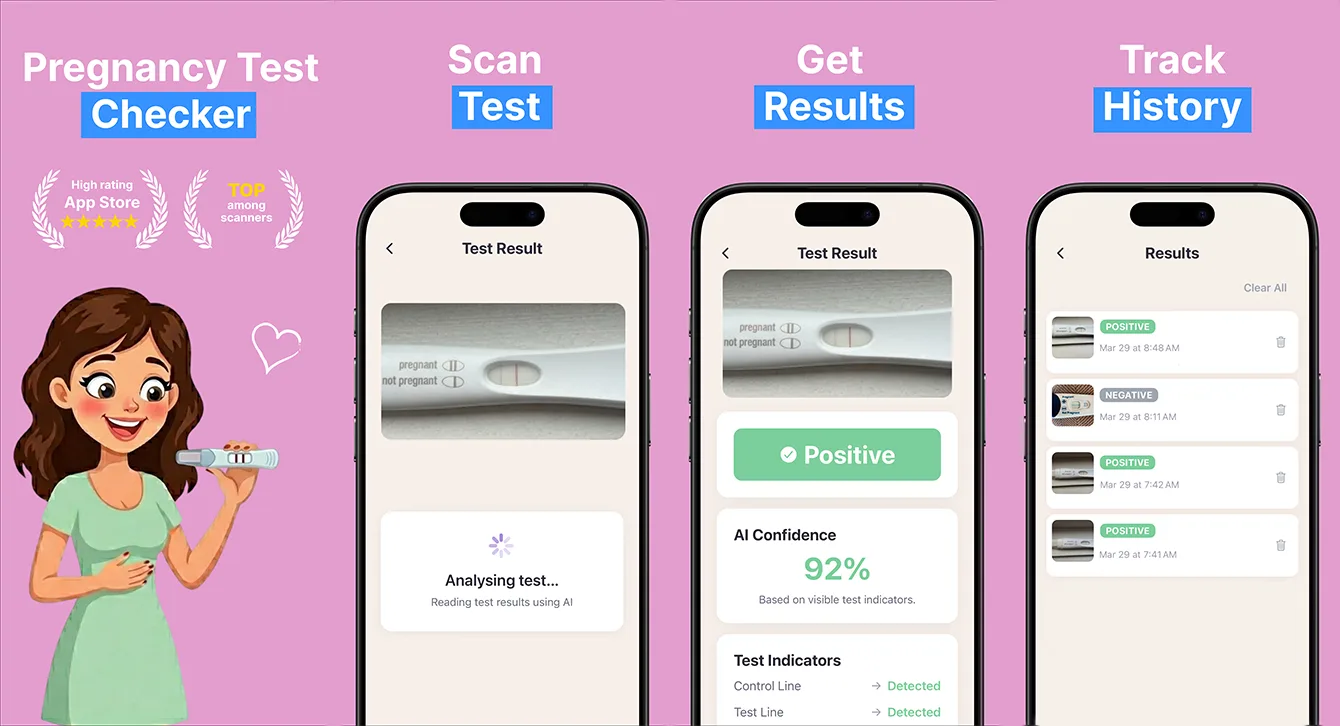
At a glance
Bebela is our own pregnancy test checker. It analyses a photo of a home test with AI, highlights the control and test lines, including faint ones, and works with more than ten brands such as Clearblue and First Response. Results come with calm guidance, history stays on the device, and the app is available in 41 languages.
- Industry
- Health & Wellness
- Type
- Own product
- Platform
- iOS (App Store)
- Languages
- 41
- Business model
- Free with a premium upgrade
- Team
- 5 specialists
- Delivered
- Cross-platform Development, MVP Development, UX/UI Design, QA, Support
- Tech stack
- iOS, Android, React Native, TypeScript, Nativewind CSS
The problem: a line you cannot quite see
Anyone who has taken an early home pregnancy test knows the moment: the control line is clear, and there might be a second line - or might not. People hold the strip up to a window, try a different lamp, take photos and adjust the contrast, and still are not sure.
Bebela is one of our own products, built for that moment. It reads a photo of the test, finds the control and test lines - including the faint ones that are hard to judge by eye - and explains the result in calm, plain language.
What the app does
- Analyses a photo of a home pregnancy test and returns a result in seconds.
- Highlights the control and test lines, including faint positives.
- Works with more than ten test brands, including Clearblue, First Response and E.P.T.
- Gives a confidence score and a detailed line-by-line breakdown (premium).
- Keeps a private history of previous checks so progression can be compared day to day.
- Pairs every result with clear, non-alarmist guidance on what to do next.
How the app reads a pregnancy test from a photo
Reading a test strip from a phone photo is an image-analysis problem with three parts, and each one has to work for the result to be trustworthy.
Finding the result window
Home tests differ in shape, strip layout and where the result window sits, so a single fixed template misreads many of them. The analysis first locates the test and its result window, whichever of the supported brands is in the photo, before it looks for any lines.
Detecting faint lines
Faint test lines are exactly where the human eye is least reliable and where phone cameras introduce the most noise - colour shifts from indoor lighting, shadows across the strip and compression artefacts. The AI analysis compares the test line against the control line on the same strip, which gives every photo its own reference rather than relying on absolute colour.
Expressing uncertainty honestly
A faint line is, by nature, an uncertain result. Rather than forcing a yes or no, the premium analysis reports a confidence score and a breakdown of what it found on each line, so the user can see why the app reached its conclusion.
Designing a health app for a sensitive result
The hardest design problem in Bebela was not technical. A pregnancy result can be hoped for or feared, and a blunt or alarming message can cause real distress either way.
- Results use calm, neutral wording and always come with a next step, such as when to retest or when to speak to a doctor.
- The app is explicit that it is for information only: "This app is for informational purposes only and is not a substitute for professional medical advice."
- History stays on the user's device, so no one else sees how often or when someone tested.
- The app is rated 13+ in the App Store.
Health apps also face closer App Store review than most categories. Making no diagnostic claims, stating the app's limits clearly and keeping personal history private is both the right thing for users and what keeps an app like this approvable.
More on designing flows that people trust in mobile app UI/UX design.
Stack and approach
Bebela is built in React Native with TypeScript and NativeWind. The camera, results, history and paywall screens share one codebase, which kept a five-person team focused on the analysis and the wording rather than on building every screen twice.
Monetisation and reach
The app is free to download and every user gets a result. "Pregnancy Test Plus" unlocks the full result with a confidence score, the detailed line breakdown, unlimited scans and saved history. Bebela is available in 41 languages, because the need is universal and most people searching for help in this moment do so in their own language.
What we would do differently
We would invest in a larger, consented set of test photos for each brand earlier. Accuracy on faint lines depends more on the breadth of real-world examples - different lighting, phones and test batches - than on any single algorithmic choice.
Building a health or image-analysis app?
The same pattern - capture a photo, analyse it, explain the result carefully - applies to many health and wellness products. The engineering is only half the job; the wording, the privacy model and App Store compliance are the other half.
Talk to us about mobile app development.
Frequently asked questions
Can an app read a pregnancy test?
An app can analyse a photo of a home pregnancy test and highlight the control and test lines, including faint ones that are hard to judge by eye. It cannot replace the test itself or a medical professional - Bebela is explicitly for information only and points users to next steps.
How does a pregnancy test checker app detect a faint line?
It locates the result window on the strip, then compares the test line against the control line on the same test. Using the control line as a reference reduces the effect of lighting and camera colour shifts, which is what makes faint lines hard to judge by eye.
Which pregnancy tests does Bebela support?
More than ten common brands, including Clearblue, First Response and E.P.T. Supporting different strip layouts and result windows was a core part of the build, because a single fixed template misreads many tests.
What should a health app do to pass App Store review?
Avoid diagnostic claims, state clearly what the app does and does not do, include an appropriate medical disclaimer, and handle personal data carefully. Bebela keeps history on the device and labels itself as informational, not a substitute for medical advice.
Related reading
Selected work
View All
Got a project in mind?
Fill the form and get a free consultation!
What will happen next?
- 1We review your request and reply within one business day (Mon-Fri, CET time zone)
- 2We contact you to arrange a meeting at a suitable time, regardless of your location
- 3We send a free quote plus our thoughts on the best approach for you
- 4Even if we do not work together, consider us a free technical resource to bounce your thoughts and questions off