EasyCab: Building a Ride Hailing App Like Uber
Book, ride, pay
Ride hailing with live maps and in-app payments.
At a glance
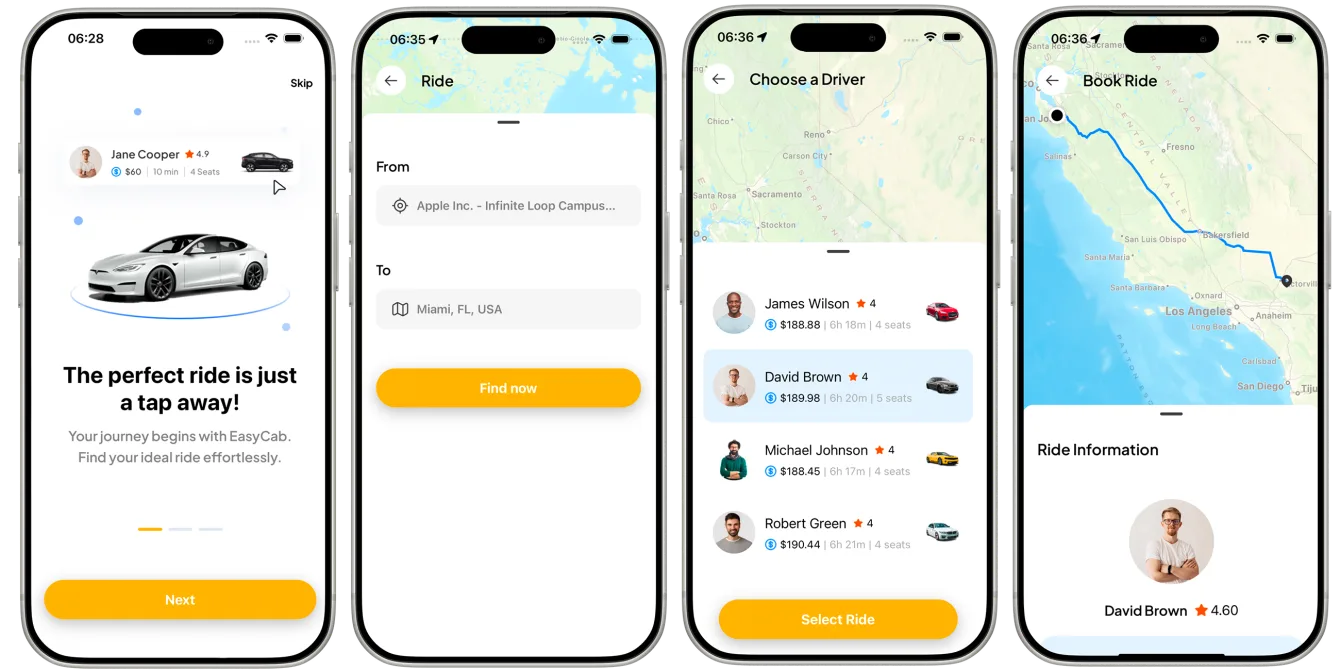
EasyCab is a ride hailing app we built for a startup under NDA. It covers sign-in with user roles, a live Google Map, ride search and selection, a detailed ride confirmation, Stripe payments and ride history. It runs on React Native and PostgreSQL, with an architecture designed so new features plug into the same booking flow.
- Industry
- Transportation & Mobility
- Client
- Ride-hailing startup (NDA)
- Platforms
- iOS, Android
- Team
- 7 specialists
- Delivered
- Cross-platform Development, MVP Development, UX/UI Design, QA, Support
- Tech stack
- React Native, PostgreSQL, Google Maps, TypeScript, Tailwind CSS
The brief: a ride-hailing MVP that can grow
EasyCab was built for a ride-hailing startup under NDA. The client needed a working product to launch with: riders signing up, finding a ride nearby, confirming it and paying, all in one app - without trying to rebuild Uber on day one.
The constraint that shaped everything was growth. An MVP that works for the first hundred rides but has to be rewritten for the next ten thousand is not a cheap MVP. The architecture had to stay simple enough to ship and structured enough to extend.
What the app does
- Onboarding and secure sign-in with email or Google.
- Role-based access, so each type of user sees only the screens and data relevant to them.
- A real-time Google Map centred on the user's location.
- Ride search and selection based on what is actually nearby.
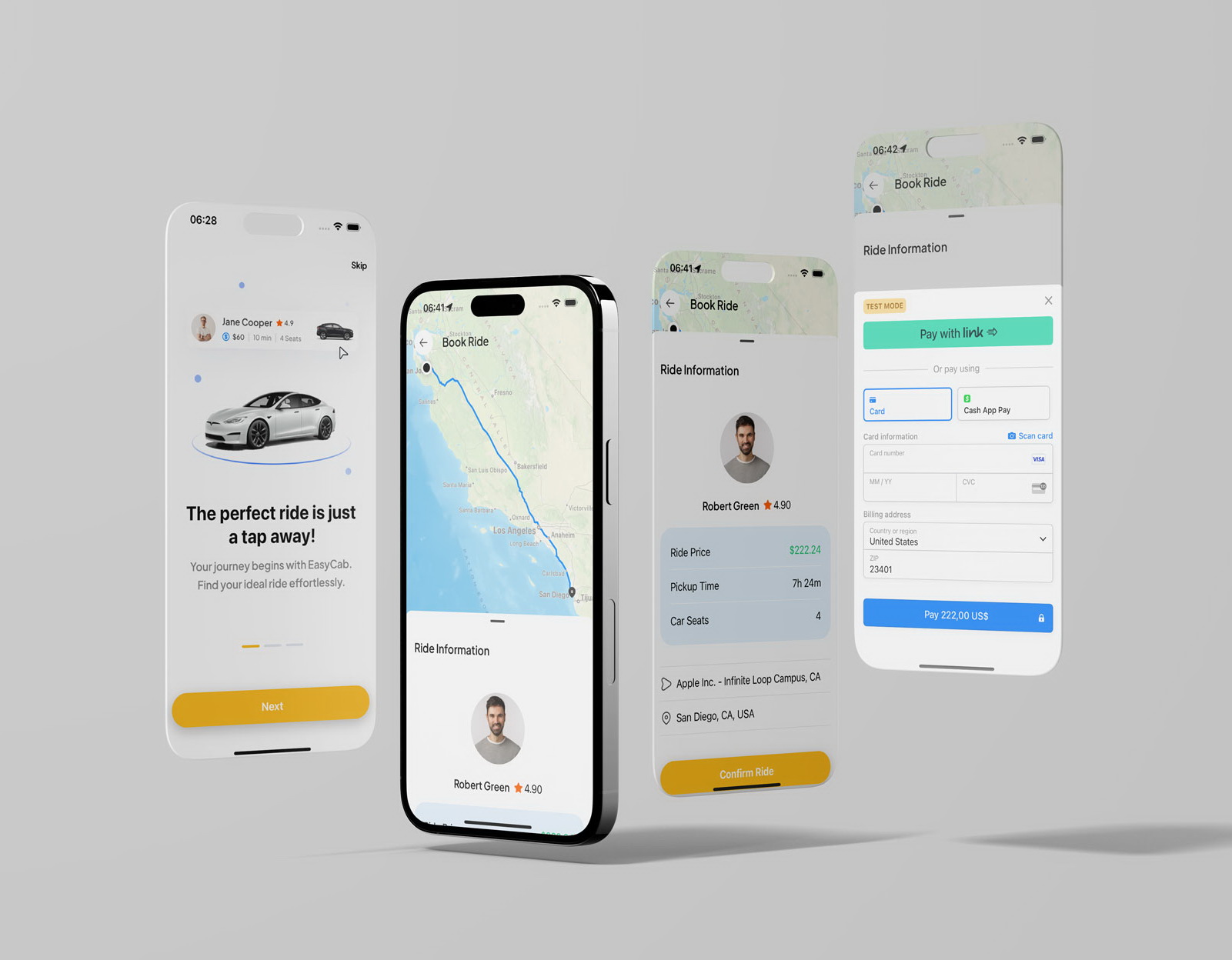
- A detailed ride confirmation: driver and rating, price, pickup time, seats, pickup and drop-off.
- In-app payment with Stripe, and a history of past rides.
How to build an app like Uber: the core pieces
Every ride-hailing app is built from the same handful of parts. Getting each one right matters more than the number of features around them.
| Piece | What it does | How EasyCab handles it |
|---|---|---|
| Identity and roles | Separates riders from other user types | Email and Google sign-in, with roles enforced on the server, not just hidden in the UI |
| Live map | Shows positions and routes as they change | Google Maps with the user's location and the route drawn between pickup and drop-off |
| Ride lifecycle | Tracks a ride from request to completion | A single ride record with clear status changes, stored in PostgreSQL |
| Payments | Charges the rider safely | Stripe's payment sheet, so card details never touch the app's own servers |
| History | Lets users review past trips | Ride history read from the same ride records |
Keeping the map live
Ride hailing depends on showing positions that are accurate right now. Two problems come with that. The first is performance: re-rendering a full map every time a position changes makes it stutter, so markers are moved and animated on top of a stable map instead. The second is battery: location updates are throttled to a sensible interval rather than sent continuously.
Location permissions are their own challenge. iOS and Android ask for location differently, and both app stores expect a clear explanation of why an app needs it. Each permission request is preceded by a plain-language reason, which helps both users and app review.
Why PostgreSQL for ride data
Rides, users and payments are closely related and have to stay consistent: a ride cannot be marked paid if the payment failed, and a cancelled ride should not appear as completed in anyone's history. A relational database with transactions handles those guarantees naturally, which is why ride and payment data lives in PostgreSQL rather than a document store.
Payments with Stripe
Payment happens only after the ride confirmation screen has shown everything the rider needs to know - driver, rating, price, pickup time and route. Stripe's native payment sheet then handles the card entry, including card scanning and faster checkout options such as Link and Cash App Pay, so sensitive details are never handled by the app's own backend.
If you are budgeting a build like this, start with how much it costs to build a mobile app.
Design decisions
- Booking takes as few steps as possible: choose a destination, pick a ride, confirm, pay.
- The confirmation screen shows everything before any money moves, which matters for a brand riders have never used before.
- Driver photo and rating are shown up front, because trust is the first question a new rider has.
- Layouts are responsive across small and large phones.
An architecture built to extend
The booking flow, from ride confirmation through payment to ride history, runs on shared, reusable code rather than screen-by-screen logic. Features that ride-hailing products typically add next - scheduled rides, promotions, in-app chat - plug into the same ride record and payment flow instead of duplicating them.
What we would do differently
We would design the real-time layer for location tracking from day one rather than adding it as the product grows, and put server-side validation of ride status changes in place earlier. Most edge cases in ride-hailing come from two parties changing the same ride at the same moment.
Want to launch a marketplace or mobility product fast? See our 30-day MVP.
Frequently asked questions
What features does a ride-hailing app need?
At minimum: sign-in with user roles, a live map with the user's location, ride search and selection, a ride confirmation showing driver, price and route, in-app payment, and ride history. Scheduled rides, promotions and in-app chat usually come after launch.
Can you build a ride-hailing app with React Native?
Yes. EasyCab uses React Native with TypeScript for iOS and Android, Google Maps for the live map, PostgreSQL for ride and payment data, and Stripe for payments. Maps and location run through native modules, while the rest of the app is shared code.
How do ride-hailing apps show the driver moving on the map?
The driver's app sends its location at regular intervals, and the rider's map moves and animates a marker to the new position instead of redrawing the whole map. Updates are throttled to balance accuracy against battery life.
How do ride-hailing apps take payments?
Through a payment provider such as Stripe. The provider's payment sheet collects and stores card details, so the app's own servers never handle them, and the app confirms the ride and price before the rider pays.
Related reading
Selected work
View All


Got a project in mind?
Fill the form and get a free consultation!
What will happen next?
- 1We review your request and reply within one business day (Mon-Fri, CET time zone)
- 2We contact you to arrange a meeting at a suitable time, regardless of your location
- 3We send a free quote plus our thoughts on the best approach for you
- 4Even if we do not work together, consider us a free technical resource to bounce your thoughts and questions off