Shopora: Building a React Native E-commerce App
Browse, save, checkout
Mobile storefront with deals, categories and fast checkout.
At a glance
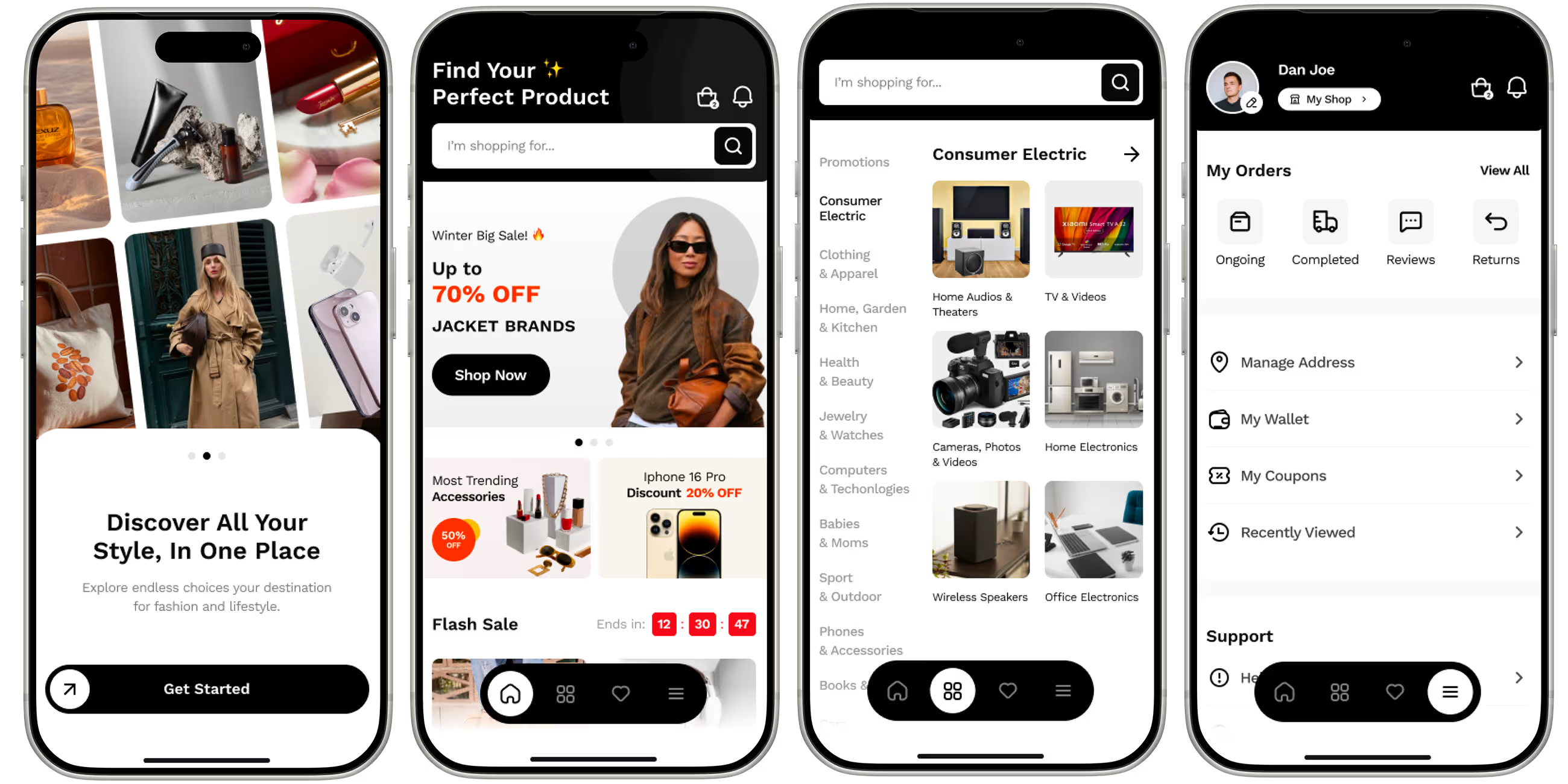
Shopora is a mobile shopping app we built for an online retailer under NDA. A personalised home feed surfaces sales and flash deals, search and categories cover a wide catalogue, Stripe handles checkout in a few taps, orders are tracked to the doorstep, and push notifications flag price drops on wishlisted items.
- Industry
- E-commerce & Retail
- Client
- Online retailer (NDA)
- Platforms
- iOS, Android
- Team
- 7 specialists
- Delivered
- Cross-platform Development, Web App Development, MVP Development, UX/UI Design, QA, Support
- Tech stack
- iOS, Android, React Native, TypeScript, Stripe, Nativewind CSS
The brief: a storefront built for phones
Shopora was built for an online retailer under NDA with a broad catalogue - consumer electronics, fashion, home and accessories. Most of its shoppers were on mobile, and the mobile web store made it hard to find deals, slow to check out and easy to forget once a tab was closed.
The brief had three parts: help shoppers find the right product in a wide catalogue, make checkout fast and trustworthy, and give them a reason to come back after the first order.
What the app does
- A personalised home feed with seasonal sales, flash deals and trending items.
- Fast product search and browsing across categories.
- A wishlist to save items for later.
- Secure checkout with Stripe in a few taps.
- Order tracking from warehouse to doorstep.
- Push notifications when prices drop on wishlisted products.
Helping shoppers find products in a wide catalogue
A broad catalogue is a strength until a shopper has to dig through it. Shopora approaches discovery from two directions. For shoppers who are browsing, the home feed puts sales, flash deals and trending items first. For shoppers who know what they want, search and category browsing get them there directly.
Feed sections are configured on the backend rather than hard-coded, so the retailer can change what is promoted - a seasonal sale, a new category - without shipping an app update.
Mobile checkout with Stripe
Checkout is where mobile purchases are lost. Long forms, unfamiliar payment screens and any doubt about security all push shoppers to abandon their cart. Shopora uses Stripe's native payment sheet, which gives shoppers a familiar, secure checkout in a few taps and keeps card details off the retailer's own servers entirely.
Prices and totals are always confirmed by the backend before payment, so a price that changed while an item sat in the cart is never charged at the old amount.
Wishlists and price-drop notifications
Not every visit ends in a purchase, and that is fine if the shopper comes back. The wishlist gives people a way to say "not yet" without losing the item. When the price of a wishlisted product drops, the app sends a push notification - a message the shopper actually wants, which is the best kind of re-engagement.
Timing the push permission request matters. Asking on first launch, before the shopper has seen any value, is the fastest way to get a no. Asking when someone adds their first item to the wishlist ties the request to a clear benefit.
Order tracking after the purchase
Once an order is placed, the most common question is "where is it?". Shopora shows each order's progress from warehouse to doorstep, which answers the question before it becomes a support email and keeps the app on the shopper's home screen between purchases.
Stack and approach
The app is built in React Native with TypeScript and NativeWind on top of a shared design system, so every screen - feed, product, cart, checkout, orders - uses the same components. That consistency is what makes a large app feel coherent, and it is what keeps adding the next screen cheap.
For the trade-offs behind choosing React Native, see React Native vs native.
What we would do differently
We would instrument the full shopping funnel - product views, add to cart, checkout started, purchase - in the very first build. An e-commerce app's most important questions are about where shoppers drop off, and those questions can only be answered with data collected from launch day.
Planning a store app? See our mobile app development services.
Frequently asked questions
What features does an e-commerce app need?
Product search and category browsing, a home feed that surfaces deals, product pages, a cart and fast secure checkout, order tracking, and a wishlist. Push notifications for price drops or back-in-stock items are the most effective way to bring shoppers back.
How do you add Stripe payments to a mobile app?
Use Stripe's native payment sheet in the app, with the backend creating the payment and confirming the final amount. The payment sheet collects card details directly, so they never pass through your own servers, and supports faster options such as saved cards.
How do price-drop notifications work in shopping apps?
The backend watches the prices of products users have wishlisted and, when one falls, sends a push notification to those users. It works best when users are asked for notification permission at the moment they wishlist something, not on first launch.
Is React Native good for e-commerce apps?
Yes. E-commerce apps are mostly lists, product pages, forms and network calls - exactly what React Native handles well - and one codebase keeps the iOS and Android stores identical as the catalogue and promotions change.
Related reading
Selected work
View All

Got a project in mind?
Fill the form and get a free consultation!
What will happen next?
- 1We review your request and reply within one business day (Mon-Fri, CET time zone)
- 2We contact you to arrange a meeting at a suitable time, regardless of your location
- 3We send a free quote plus our thoughts on the best approach for you
- 4Even if we do not work together, consider us a free technical resource to bounce your thoughts and questions off