BigBite: Building a Restaurant Food Ordering App
Pick, customise, order
Burger ordering with custom portions and quick checkout.
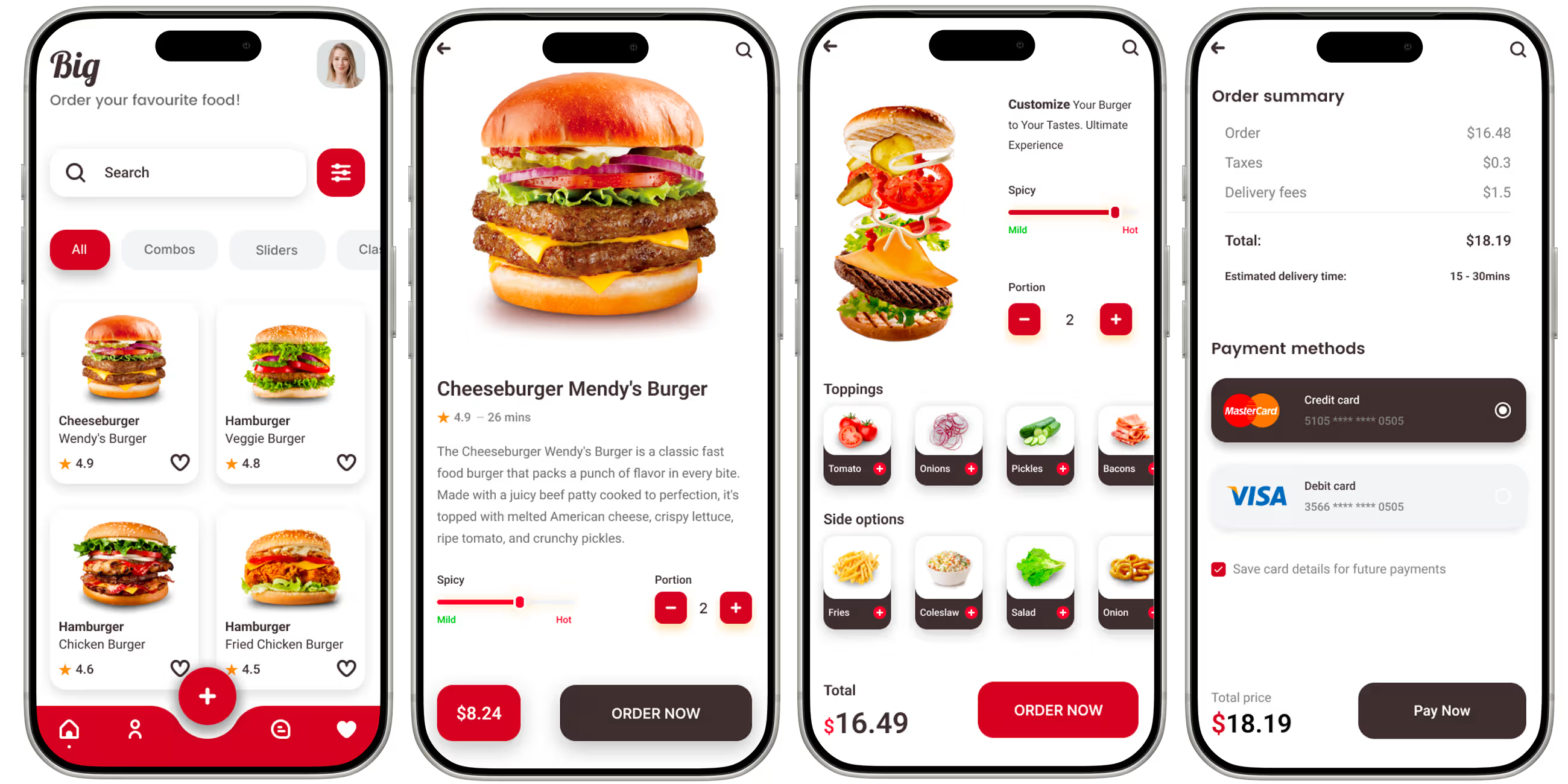
At a glance
BigBite is a food ordering app we built for a burger restaurant under NDA, so it could take orders directly instead of through commission-based delivery platforms. Customers customise spice level and portion size, reorder favourites in a couple of taps, pay in the app and follow live order status powered by Firebase.
- Industry
- Food & Delivery
- Client
- Burger restaurant (NDA)
- Platforms
- iOS, Android
- Team
- 6 specialists
- Delivered
- Cross-platform Development, Web App Development, MVP Development, UX/UI Design, QA, Support
- Tech stack
- iOS, Android, React Native, TypeScript, Firebase, Nativewind CSS
The brief: a restaurant's own ordering app
BigBite was built for a burger restaurant under NDA. Like many restaurants, it relied on third-party delivery platforms that take a commission on every order and own the relationship with the customer. The restaurant wanted its own app: its brand, its menu, its customers, and direct orders for pickup and delivery.
Burgers are rarely ordered exactly as listed, so the app had to handle customisation properly, make regular orders quick to repeat, and keep customers informed while they wait.
What the app does
- A menu organised into burgers, sliders and sides.
- A rich detail screen for every item.
- Customisation of spice level and portion size before adding to the cart.
- Ratings and favourites for quick reordering.
- In-app payment.
- Live order status from the kitchen to pickup or delivery.
Modelling a customisable menu
Customisation is where food ordering apps most often go wrong: the customer chooses extra spicy and a large portion, and the kitchen receives a plain regular burger. BigBite models every menu item with modifier groups - spice level, portion size - each with its own options and any price difference.
When an order is placed, the app saves a snapshot of exactly what was chosen, including each option and its price at that moment. If the menu changes later, orders already placed are unaffected, and the kitchen always sees the order as the customer built it.
Order totals are calculated on the server from the menu, not taken from the phone, so the price charged is always the price on the menu.
Live order status with Firebase
Not knowing where an order is leads to phone calls and frustration. BigBite uses Firebase's real-time database listeners, so when staff move an order from received to preparing to ready, the customer's screen updates instantly without refreshing. Key steps are also sent as push notifications for customers who have closed the app.
Security rules make sure customers can read only their own orders, and only staff can change an order's status.
Making reorders take seconds
Regular customers tend to order the same things. Hunting through the menu every time is friction that sends them back to a delivery platform. Favourites and ratings let them find and repeat a usual order in a couple of taps, which is the habit that makes a restaurant's own app worth having.
Design decisions
- Clear menu sections - burgers, sliders, sides - instead of one long scroll.
- Customisation happens on the item's detail screen, before it goes into the cart, so the cart is always accurate.
- Order status is shown as a simple progress tracker that answers "where is my food?" at a glance.
More on designing flows like these in mobile app UI/UX design.
Stack and approach
The app is built in React Native with TypeScript and NativeWind on Firebase for authentication, data, server-side functions and push notifications. Firebase's real-time listeners suit order tracking particularly well, and its managed infrastructure means a restaurant does not need its own server team.
What we would do differently
We would design the staff side as a tablet-first screen from the start and add estimated ready times to each order. Both reduce the number of times a customer has to wonder whether their order has been forgotten.
Want an ordering app for your restaurant? See our mobile app development services.
Frequently asked questions
What features does a restaurant ordering app need?
A clear menu with item details, customisation options such as size and spice level, a cart and in-app payment, live order status, and favourites for quick reordering. A staff view for managing incoming orders is the other half of the system.
How do food ordering apps handle menu customisation?
Each item has modifier groups with options and price differences. When an order is placed, the app stores a snapshot of the exact choices and prices, so the kitchen sees what the customer chose and later menu changes do not affect existing orders.
How does live order tracking work in a food app?
Staff update the order's status, and the customer's app listens for changes in real time, updating the screen instantly. BigBite uses Firebase listeners for this, with push notifications for customers who are not in the app.
Why build your own restaurant app instead of using delivery platforms?
Delivery platforms charge commission on every order and own the customer relationship. An own app lets a restaurant keep the margin, its brand and its customer data, with features like favourites and reordering that build repeat business.
Related reading
Selected work
View All

Got a project in mind?
Fill the form and get a free consultation!
What will happen next?
- 1We review your request and reply within one business day (Mon-Fri, CET time zone)
- 2We contact you to arrange a meeting at a suitable time, regardless of your location
- 3We send a free quote plus our thoughts on the best approach for you
- 4Even if we do not work together, consider us a free technical resource to bounce your thoughts and questions off