RoofScout: Building a Real Estate App for Property Search
Search, filter, save
Property browsing with search, filters and saved profiles.
At a glance
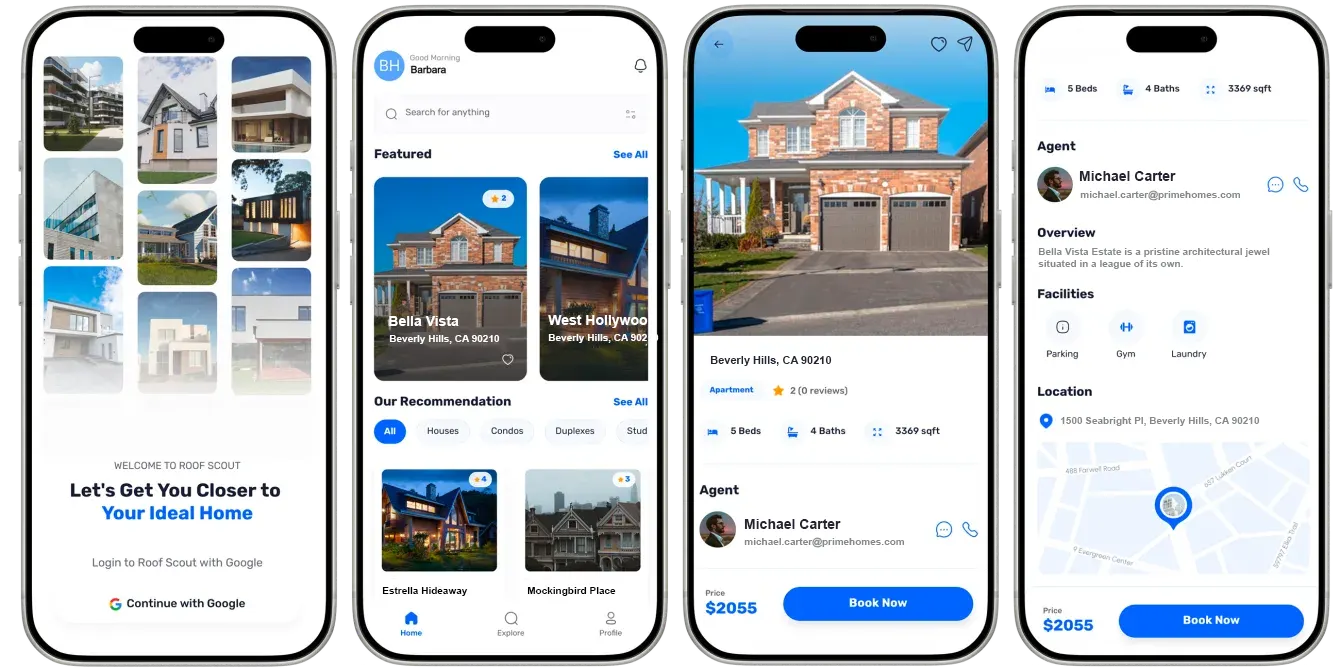
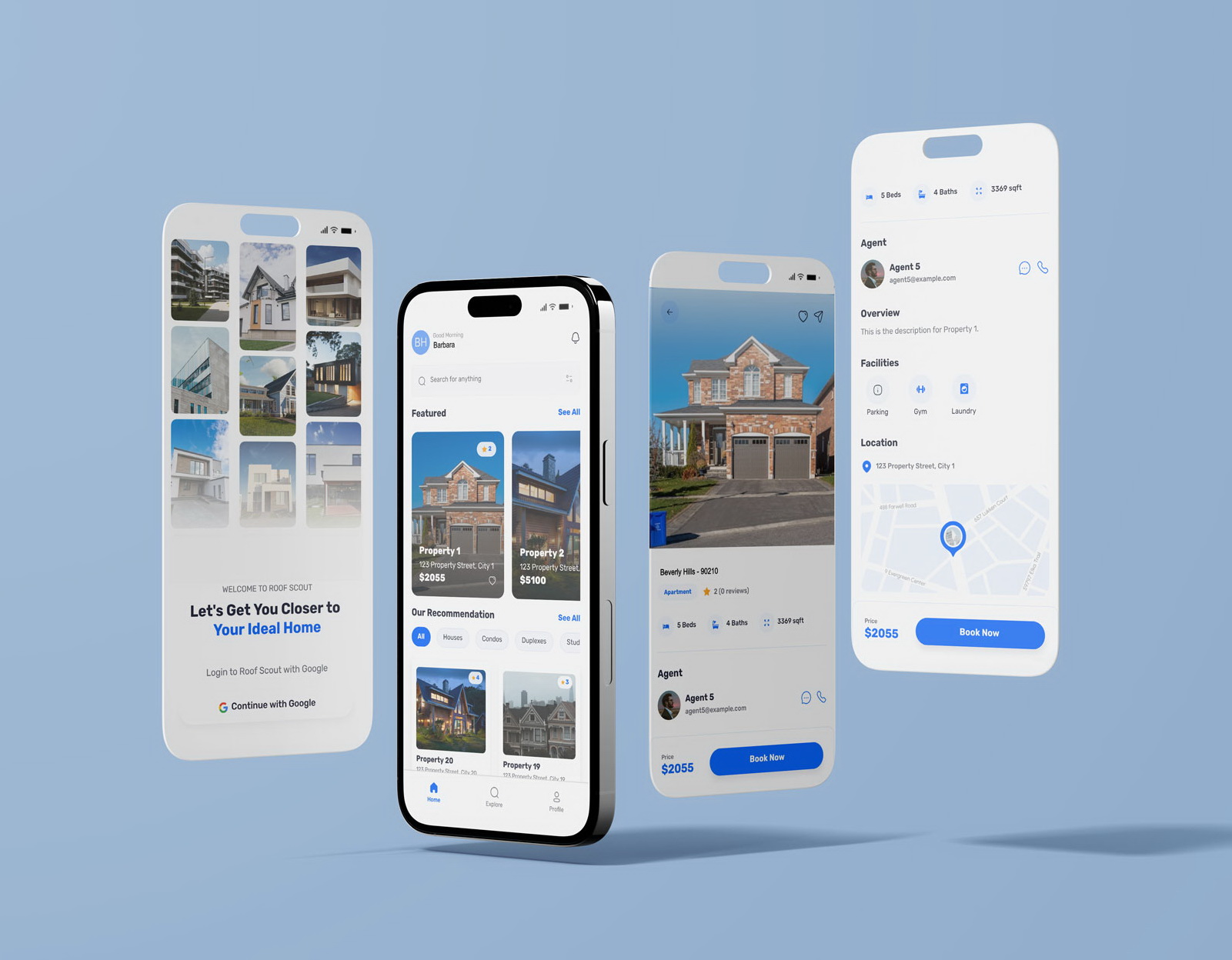
RoofScout is a real estate app we built for a property company under NDA. Buyers search and filter listings from the home screen, compare consistent listing cards, open full details with beds, baths, facilities, map and agent contact, and save favourites behind one-tap Google sign-in. Search runs on the backend so it stays fast as listings grow.
- Industry
- Real Estate & Property
- Client
- Real estate company (NDA)
- Platforms
- iOS, Android
- Team
- 6 specialists
- Delivered
- Cross-platform Development, Web App Development, MVP Development, UX/UI Design, QA, Support
- Tech stack
- React Native, TypeScript, Tailwind CSS
The brief: listings people can actually narrow down
RoofScout was built for a real estate company under NDA. Buyers and renters were browsing listings on a website that was hard to use on a phone, and scrolling through every property to find the few that matched their criteria.
The goal was a mobile app where people start with what they want - a type of home, a price, a location - see consistent, comparable listings, and keep track of the ones they like.
What the app does
- One-tap sign-in with Google.
- Search and filters on the home screen, including property types such as houses, condos, duplexes and studios.
- Featured listings and recommendations.
- Consistent listing cards: photo, name, address and price.
- Full property details: beds, baths, floor area, facilities, location on a map and the listing agent.
- Favourites and customisable profile settings.
Essential features of a real estate app
Property apps succeed or fail on a few fundamentals. Everything else - mortgage calculators, virtual tours, market reports - is secondary if these are not right.
| Feature | Why it matters | In RoofScout |
|---|---|---|
| Search and filters | Buyers arrive with criteria, not curiosity | On the home screen, not behind a menu |
| Consistent listings | People compare properties side by side | Every card shows the same fields in the same place |
| Rich details | The decision to enquire happens here | Beds, baths, area, facilities, map and agent on one screen |
| Easy contact | The enquiry is the conversion | Message or call the agent directly from the listing |
| Saved properties | House hunting takes weeks | Favourites tied to the user's account |
Building search and filters that stay fast
Filtering on the phone works with a few dozen listings and falls apart with a few thousand. RoofScout runs search and filters as queries on the backend, returns results in pages, and loads more as the user scrolls, so the app stays fast however large the catalogue grows.
Property apps are also image-heavy. Lists use appropriately sized thumbnails and load images lazily, so scrolling stays smooth on lower-end Android phones, and full-size photos are fetched only on the details screen.
Secure accounts without a registration form
Saved properties and preferences need an account, but long sign-up forms lose people before they have seen a single listing. Google sign-in handles authentication in one tap, and favourites and profile settings are stored against that account so they follow the user across devices.
Design decisions
- Search sits at the top of the home screen, with property type filters directly beneath it.
- Listing cards follow one layout, so price and location are always in the same place.
- The details screen leads with the photo and the numbers buyers check first: beds, baths and floor area.
- Agent contact and price stay visible at the bottom of the details screen, so the next step is always one tap away.
More on the principles behind these choices in mobile app UI/UX design.
What we would do differently
We would include saved-search alerts in the first release - a push notification when a new listing matches what someone is looking for. It is the feature that brings house hunters back to the app instead of to a competitor, and it is simpler to design in from the start than to add later.
Planning a property platform for mobile and web? See our mobile app development services.
Frequently asked questions
What features should a real estate app have?
Search and filters by type, price and location; consistent listing cards; a detailed property page with photos, key numbers, facilities and a map; direct contact with the agent; and saved favourites. Saved-search alerts are the most valuable next step.
How do you keep property search fast in a mobile app?
Run search and filtering on the backend instead of on the phone, return results in pages, and load images as thumbnails in lists. That keeps the app fast regardless of how many listings there are.
Do real estate apps need user accounts?
For browsing, no; for saving properties and preferences, yes. One-tap sign-in such as Google keeps the barrier low while still tying favourites and settings to the user.
Can a real estate app be built with React Native?
Yes. RoofScout was built in React Native with TypeScript, which delivers the same listings experience on iOS and Android from one codebase.
Related reading
Selected work
View All
Got a project in mind?
Fill the form and get a free consultation!
What will happen next?
- 1We review your request and reply within one business day (Mon-Fri, CET time zone)
- 2We contact you to arrange a meeting at a suitable time, regardless of your location
- 3We send a free quote plus our thoughts on the best approach for you
- 4Even if we do not work together, consider us a free technical resource to bounce your thoughts and questions off